
Kargo's DORA metrics dashboard reports Change Failure Rate and related metrics per stage by default, which can make it hard to see whether a failure is isolated or affecting the whole delivery pipeline.
To measure failure rate by pipeline (project) instead of by individual stage:
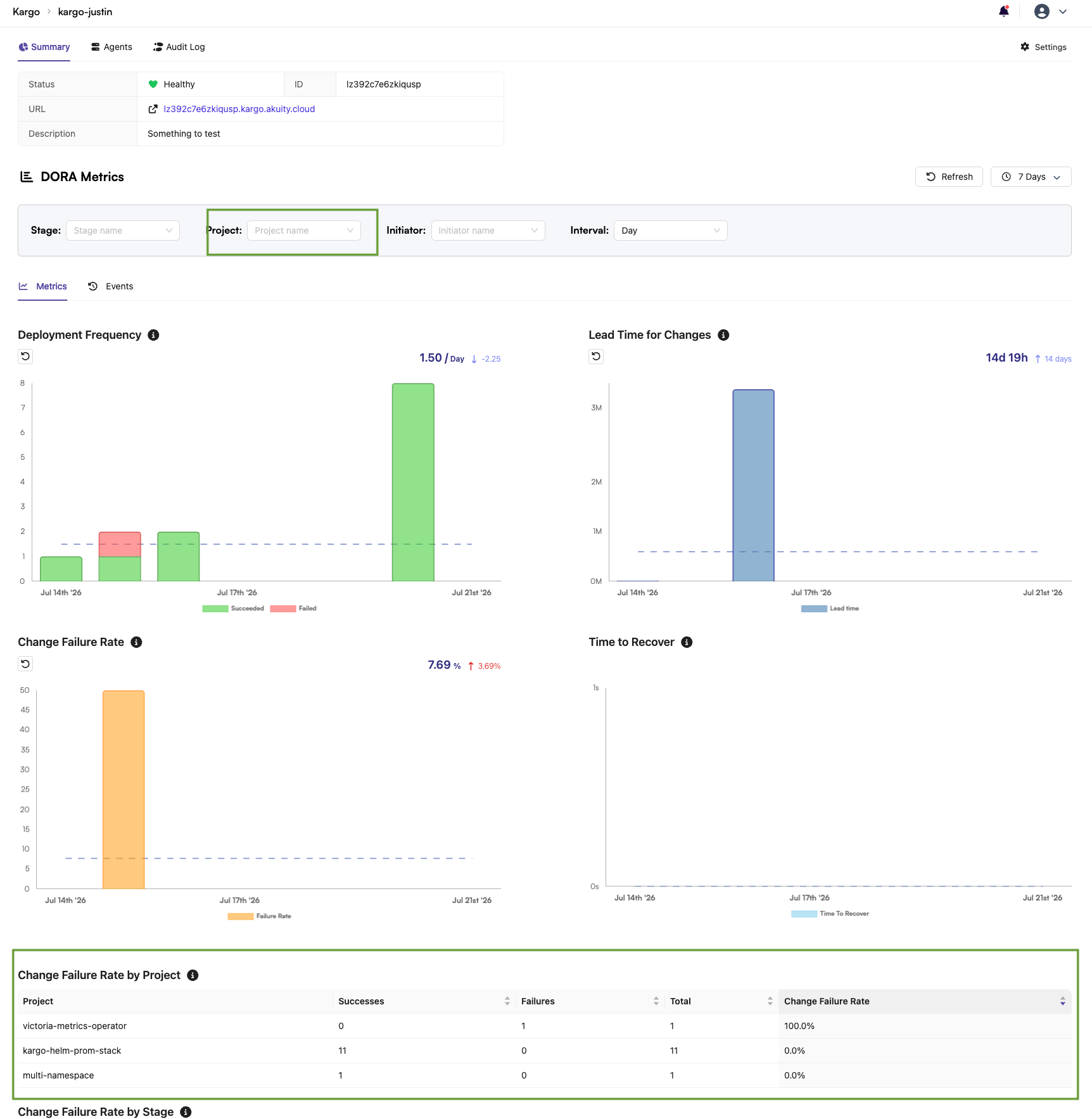
- Use the project dropdown on the DORA metrics dashboard to select the project you're interested in.
- Metrics shown will then reflect that project as a whole, aggregating across all of its stages.
- Use the Change Failure Rate by Project table to quickly sort and compare failure rates across projects.
Current limitation — cluster-level granularity: if a single stage fans out to multiple clusters (for example, via an ApplicationSet), a failure on just one of those clusters currently causes the entire stage to be reported as failing, without indicating which cluster failed. There is no built-in way today to drill from the DORA dashboard down to the specific failing cluster.
As a workaround, cross-reference the failing stage/timeframe with Argo CD directly, using the labels set by the argocd-wait step to identify which Application (and therefore which cluster) failed.
Per-cluster failure granularity in the DORA metrics view is on the roadmap; check with your Akuity account team for the latest status, and note that ingestion of these metrics into external engineering-metrics data lakes is also being scoped.
⚠️ Verify before publishing: confirm current roadmap status for per-cluster DORA granularity.