Overview
When attempting to access a Kargo environment hosted on the Akuity Platform, users may encounter a "Login is Disabled" error. This is a configuration state — not a bug — and occurs when neither Single Sign-On (SSO) nor the admin System Account has been enabled for the environment. This article explains why this happens and what steps need to be taken to restore access.
Problem
Symptom: Upon navigating to the Kargo login page, the user is presented with the following message:
"Login is disabled"
The user is unable to proceed past the login screen, regardless of the credentials they attempt to use.
Who is affected: Any user or team member attempting to access a Kargo instance on the Akuity Platform where login has not yet been configured by a platform administrator.
Root Cause
By default, Kargo login is not automatically enabled when an environment is provisioned on the Akuity Platform. Login access requires explicit configuration by someone with Akuity Platform management permissions. Until one of the supported login methods is configured, the login screen will remain disabled for all users.
Resolution
A user with Akuity Platform admin or management permissions must take one of the following actions:
Option 1 — Configure Single Sign-On (SSO) Set up SSO integration for the Kargo environment via the Akuity Platform settings. This is the recommended approach for teams and shared environments, as it ties access to your existing identity provider (e.g., Okta, GitHub, Google Workspace).
Option 2 — Enable the Admin System Account Enable the built-in admin System Account for the Kargo instance through the Akuity Platform. This is a quicker option suitable for initial experimentation or development environments, though it should be used with appropriate caution in production contexts.
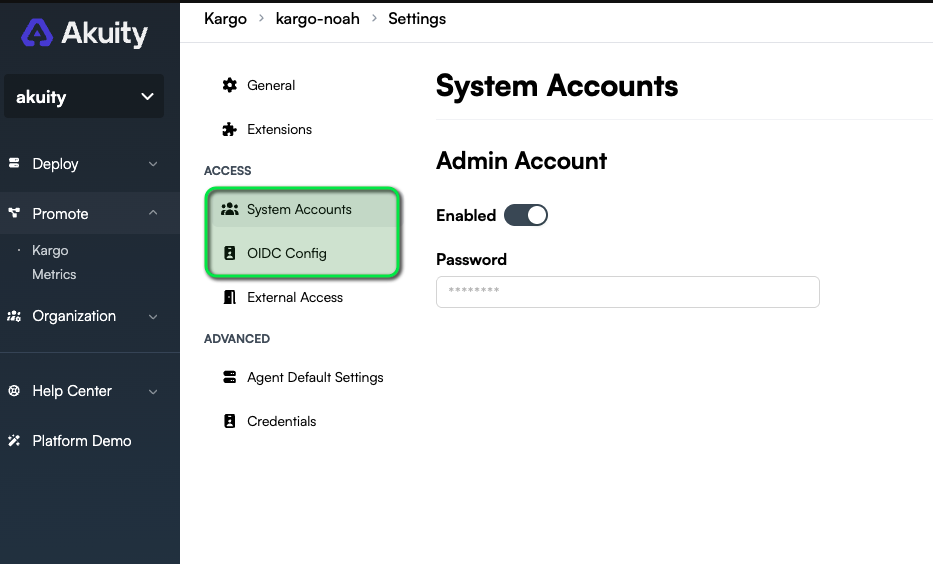
Once either option is configured, users will be able to log in to Kargo normally.
Who Can Perform This Action
Only users with management-level permissions on the Akuity Platform can enable login. If you are unsure who holds this role in your organization, check with your platform or infrastructure team.